
Before getting started, the word polymorphism comes from Greek and means having many forms. So the polymorphic in the title of this article can be read as of many forms or taking various forms. In computer science, polymorphism means that a programming element can be expressed in several forms, and it usually refers to an object being able to appear as several different types.
A polymorphic UI component, then, can be restated as a UI component that takes various forms. I think that phrase means the following.
- A UI component that can express various semantics
- A UI component that can have various attributes
- A UI component that can have various styles
In web frontend terms, a polymorphic component can become any element depending on the code, and can use the attributes of that element. That means it can use whatever semantics fit the situation, and it can become a component with a special purpose, like an anchor tag. In the end, a polymorphic component is one that starts from nothing and can become anything, and it can be seen as the most abstracted form of a component.
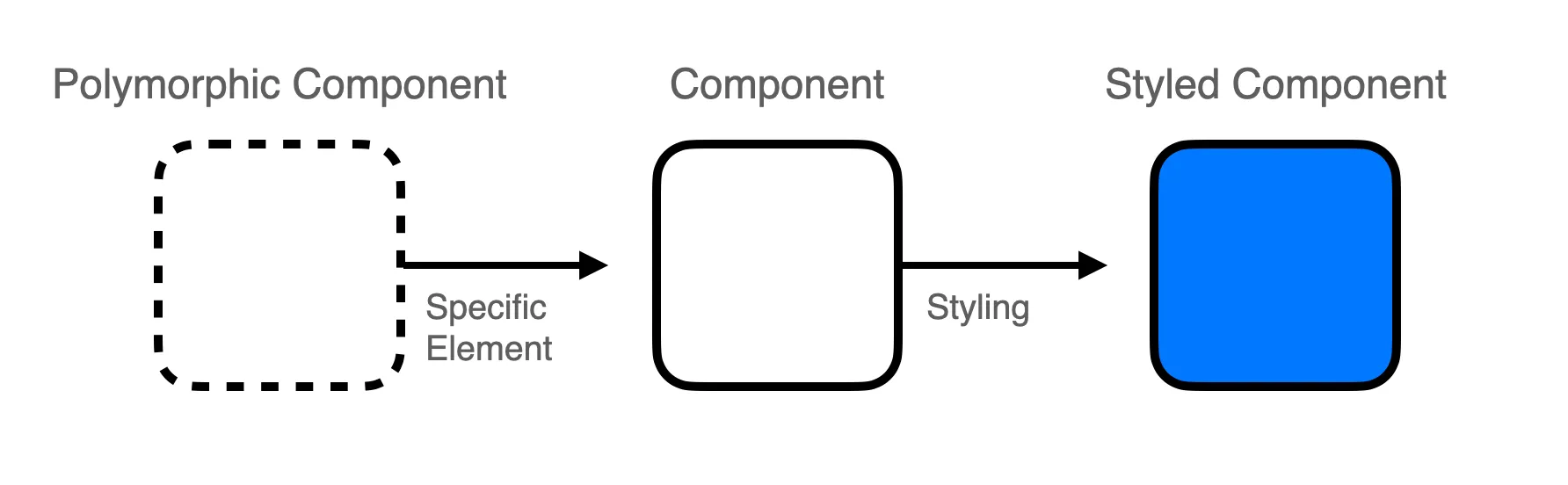
So if you look inside a React UI kit, you will probably find the polymorphic component pattern in use. MUI’s Box component and Mantine’s Box component are examples. Both UI libraries use a polymorphic component called Box to improve reusability and to implement a wide variety of components in an extensible way. It’s such a useful component that the design system built and used at the company I work for also implements a View component and uses it in a similar way.
Unfortunately, there is almost nothing written about polymorphic components in Korean, and even in English it’s hard to find material that explains them concretely, so I decided to write about them.
Recognizing the Problem
Without a real example, it can be hard to see why this component is needed. Look at the following code.
/**
 * Button.jsx
 */
export const Button = ({ ...props }) => {
  return (
    <button
      style={{ backgroundColor: 'black', color: 'white' }}
      {...props}
    />
  );
}

/**
 * App.jsx
 */
import { Button } from './Button';

const App = () => {
  return (
    <div>
      <Button onClick={() => alert('Good!')}>Click Me!</Button>
    </div>
  );
}
The code needs no explanation. It’s minimal, but components that only apply a style, like the one above, are used a lot in practice. Since the Button component passes every prop it receives on to the button tag as attributes, you could think of it as an extensible component. But what if you want to add a page link to the button?
import { Button } from './Button';

const App = () => {
  return (
    <div>
      <a href="https://kciter.so">
        <Button>Click Me!</Button>
      </a>
    </div>
  );
}
You could write it like this, but in terms of reusability it isn’t a very good approach. You could also make a new component with future reuse in mind.
/**
 * Button.jsx
 */
export const Button = ({ ...props }) => {
  return (
    <button
      style={{ backgroundColor: 'black', color: 'white' }}
      {...props}
    />
  );
}

/**
 * LinkButton.jsx
 */
import { Button } from './Button';

export const LinkButton = ({ href, ...props }) => {
  return (
    <a href={href}>
      <Button {...props} />
    </a>
  );
}

/**
 * App.jsx
 */
import { LinkButton } from './LinkButton';

const App = () => {
  return (
    <div>
      <LinkButton href="https://kciter.so">Click Me!</LinkButton>
    </div>
  );
}
This works too, but now the a tag can’t be extended, and a new dependency between components has been added. And if you use a Link component for an SPA, from react-router or Next.js, you end up having to make yet another component. A polymorphic component can be used to solve this.
Implementing It in JavaScript
In JavaScript, since you’re free from type safety, implementing a polymorphic component isn’t hard. That freedom is JavaScript’s weakness, but here it also makes the implementation easy. You can make a polymorphic component as simply as this.
export const View = forwardRef(({ as, ...props }, ref) => {
  const Element = as || "div";
  return <Element ref={ref} {...props} />;
});
The View component implemented here is the most abstract component in React. Through as, it can become any component, including the built-in ones. If as is omitted, it uses div by default. The component is written so that any needed attributes can be passed through freely, and forwardRef lets a parent component access the element. It can be used like this.
import { View } from './View';

const App = () => {
  return (
    <div>
      <View as="a" href="https://kciter.so">Click Me!</View>
    </div>
  );
}
In this code, as changes the element used by the View component to an a tag, and the href attribute is used. Running it shows a link that says Click Me!. Used only like this, it’s normal not to see the point. You could just write an a tag, so there’s no need to make a component. But the code above can also be used like this.
/**
 * Button.jsx
 */
import View from './View';

export const Button = ({ as, ...props }) => {
  return (
    // uses the View component built above
    <View as={as || 'button'}
      style={{ backgroundColor: 'black', color: 'white' }}
      {...props}
    />
  );
}

// or it can be written like this
export const Button = ({ as, ...props }) => {
  const Element = as || 'button';
  return (
    <Element
      style={{ backgroundColor: 'black', color: 'white' }}
      {...props}
    />
  );
}

/**
 * App.jsx
 */
import { Button } from './Button';

const App = () => {
  return (
    <div>
      {/* it can be used just like an anchor tag */}
      <Button as="a" href="https://kciter.so">Click Me!</Button>
    </div>
  );
}
Looking back at Recognizing the Problem, we met the requirement there by making a LinkButton component. If you write the component polymorphically, as in the code above, you remove the duplicated code and get a more flexible component. This case comes up often and the implementation is simple, so it is a good component design.
Implementing It in TypeScript
The downside of using JavaScript is that you can’t use IntelliSense1. You do get some autocompletion, but compared to TypeScript it is not enough. The code above switches to a different element through as, but the developer has to judge which attributes can be passed. Or the developer might make a typo and pass a wrong value to as. You can solve these problems by implementing a type-safe polymorphic component in TypeScript.
Expressing the Element and Its Attributes
To keep the same usage as the JavaScript code while also getting autocompletion, we need type definitions. Start with the following code.
/**
 * View.tsx
 */
interface ViewProps<T extends React.ElementType> {
  as?: T;
}

export const View = <T extends React.ElementType = "div">({
  as,
  ...props
}: ViewProps<T>) => {
  const Element = as || "div";
  return <Element {...props} />;
};

/**
 * App.tsx
 */
import { View } from "./components/View";

const App = () => {
  return (
    // an error occurs on the component
    <View as="a" href="https://kciter.so">
      Link
    </View>
  );
}

export default App;
React.ElementType is a type that accepts both built-in JSX components and user-defined components, and it’s defined as string | React.ComponentType<any>. Using this type with a generic lets you change the element through as, just as the JavaScript code did.
But if you write the View component this way, there’s no way to know which element as is trying to use. So the following error occurs.
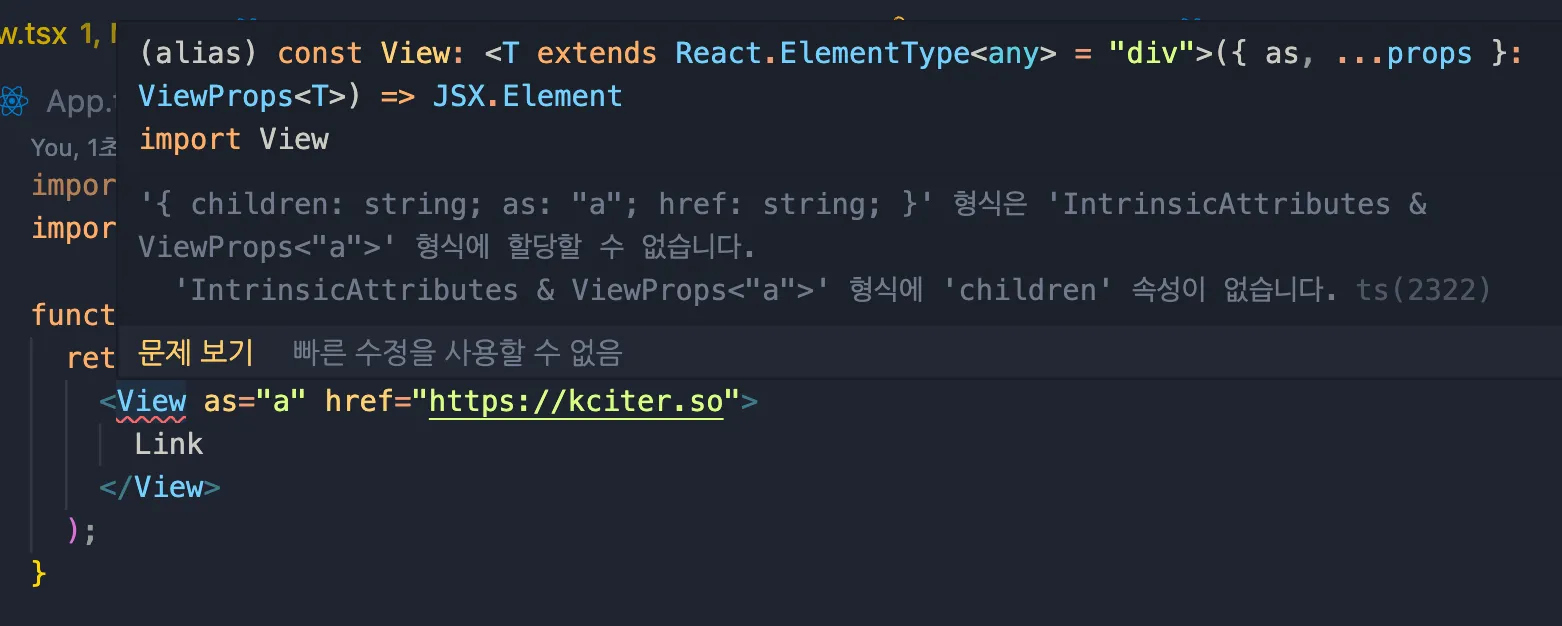
Type '{ children: string; as: "a"; href: string; }' is not assignable to type 'IntrinsicAttributes & ViewProps<"a">'.
  Property 'children' does not exist on type 'IntrinsicAttributes & ViewProps<"a">'. ts(2322)
The error message says the values passed as props don’t match the type. To fix this, the View component can be modified as follows.
type ViewProps<T extends React.ElementType> = {
  as?: T;
} & React.ComponentPropsWithoutRef<T>;

export const View = <T extends React.ElementType = "div">({
  as,
  ...props
}: ViewProps<T>) => {
  const Element = as || "div";
  return <Element {...props} />;
};
React.ComponentPropsWithoutRef is a type that lets you define all the attributes except ref. With this type, the generic gives us the rest of the attributes. But we still can’t receive ref.
Receiving a ref
So far, nothing should have been hard to understand. There isn’t much code, so it’s easier to implement than it looks. Adding ref is where it gets a little more complicated. First, look at the following code.
type ViewProps<T extends React.ElementType> = {
  as?: T;
} & React.ComponentPropsWithoutRef<T>;

export const View = forwardRef(
  <T extends React.ElementType = "div">(
    { as, ...props }: ViewProps<T>,
    ref: React.ComponentPropsWithRef<T>["ref"] // take only the ref
  ) => {
    const Element = as || "div";
    return <Element ref={ref} {...props} />;
  }
);
You might think that using the provided React.ComponentPropsWithRef type, as above, solves it easily, but as shown below the type is unknown. That means no error occurs even when the type is wrong.
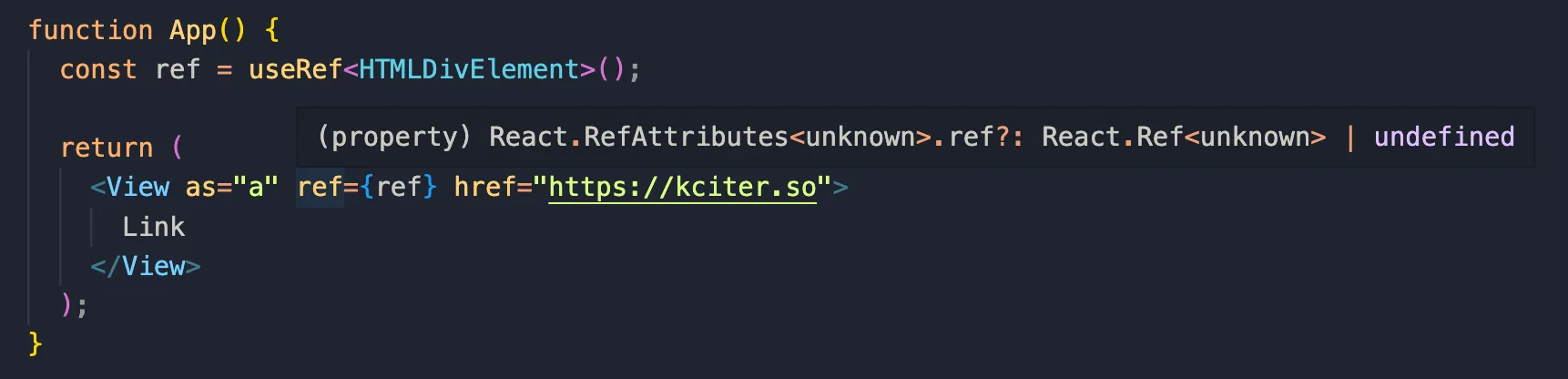
This happens because the type of forwardRef is still ambiguous. It looks properly defined, but the generic was only applied to the function parameters, not to the function itself. So a generic type definition for forwardRef is needed. To define the type, let’s check how the forwardRef function is defined.
function forwardRef<T, P = {}>(render: ForwardRefRenderFunction<T, P>): ForwardRefExoticComponent<PropsWithoutRef<P> & RefAttributes<T>>;

interface ForwardRefExoticComponent<P> extends NamedExoticComponent<P> {
  defaultProps?: Partial<P> | undefined;
  propTypes?: WeakValidationMap<P> | undefined;
}

interface NamedExoticComponent<P = {}> extends ExoticComponent<P> {
  displayName?: string | undefined;
}

interface ExoticComponent<P = {}> {
  (props: P): (ReactElement|null);
  readonly $$typeof: symbol;
}
The return type of the forwardRef function is ForwardRefExoticComponent<PropsWithoutRef<P> & RefAttributes<T>>. ForwardRefExoticComponent eventually inherits from the ExoticComponent interface, and reading its contents shows that it ends up being the shape of a function component.
So we need to make PropsWithoutRef<P> & RefAttributes<T> the type of the View component. RefAttributes is defined as follows.
interface RefAttributes<T> extends Attributes {
  ref?: Ref<T> | undefined;
}
ComponentPropsWithRef already has RefAttributes combined into it, so the View component can be completed with the following declaration.
type ViewProps<T extends React.ElementType> = {
  as?: T;
} & React.ComponentPropsWithoutRef<T>;

type ViewComponent = <C extends React.ElementType = "div">(
  props: ViewProps<C> & {
    ref?: React.ComponentPropsWithRef<C>["ref"];
  }
) => React.ReactElement | null;

export const View: ViewComponent = forwardRef(
  <T extends React.ElementType = "div">(
    { as, ...props }: ViewProps<T>,
    ref: React.ComponentPropsWithRef<T>["ref"]
  ) => {
    const Element = as || "div";
    return <Element ref={ref} {...props} />;
  }
);
After applying this code, checking the App component again shows an error, because the ref uses the type HTMLDivElement, which doesn’t match the component type.
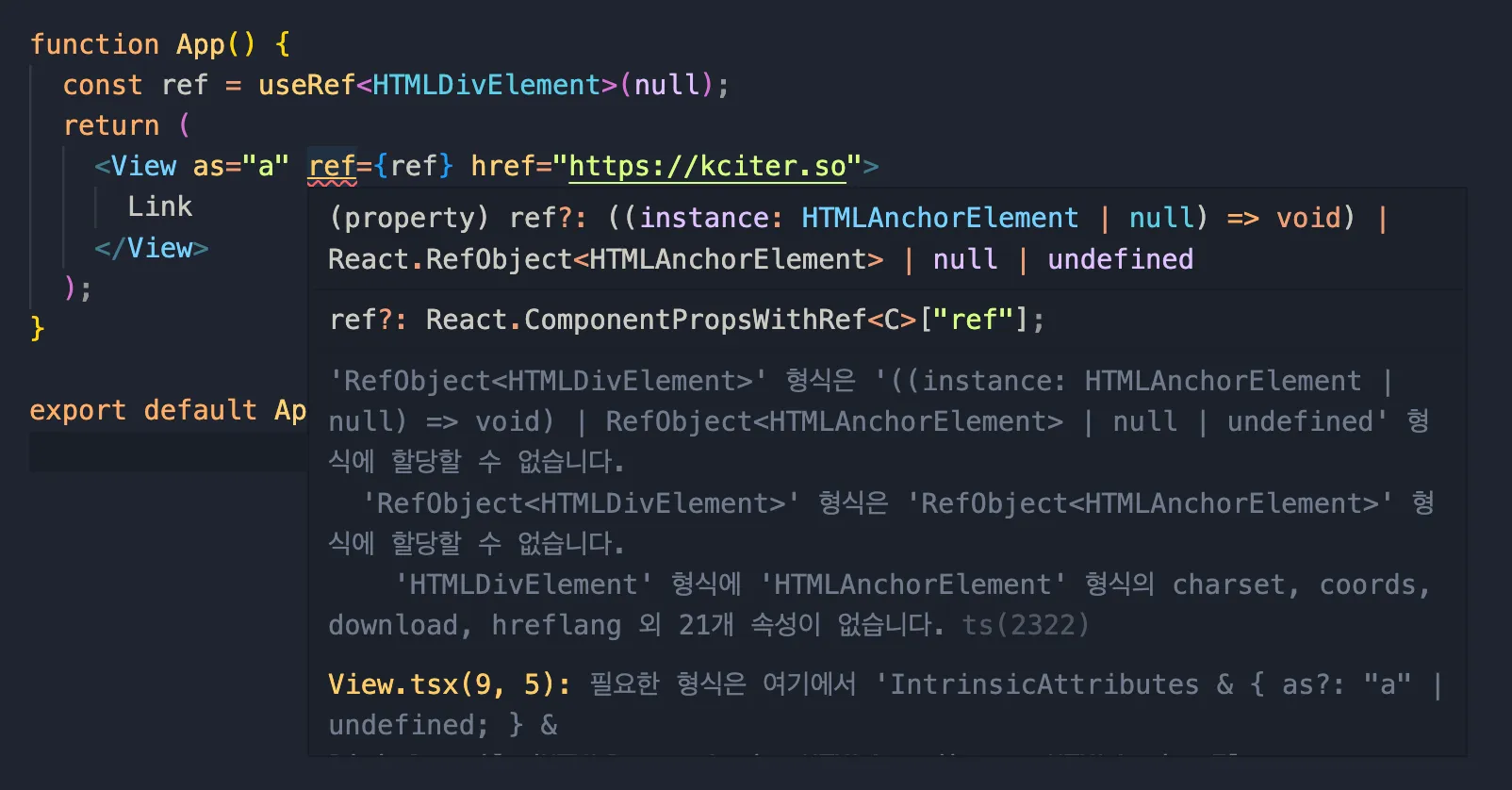
Type 'RefObject<HTMLDivElement>' is not assignable to type '((instance: HTMLAnchorElement | null) => void) | RefObject<HTMLAnchorElement> | null | undefined'.
  Type 'RefObject<HTMLDivElement>' is not assignable to type 'RefObject<HTMLAnchorElement>'.
    Type 'HTMLDivElement' is missing the following properties from type 'HTMLAnchorElement': charset, coords, download, hreflang, and 21 more. ts(2322)
Now change the generic type of useRef to HTMLAnchorElement and it runs normally.
Making It Reusable
At this point, the complicated part is mostly over. So far the types were defined only for the View component. Let’s abstract the types one more level so they can be used more generally.
// separate `as` out of the ViewProps written earlier
type AsProp<T extends React.ElementType> = {
  as?: T;
};

// give it an intuitive name and make it a type
export type PolymorphicRef<T extends React.ElementType> =
  React.ComponentPropsWithRef<T>["ref"];

// build the combined type
export type PolymorphicComponentProps<
  T extends React.ElementType,
  Props = {}
> = AsProp<T> & React.ComponentPropsWithoutRef<T> & Props & {
  ref?: PolymorphicRef<T>;
};
The existing ViewProps type is broken apart, and a generic type called PolymorphicComponentProps is created so that needed attributes can be added. Let’s make a new component with this type.
type _TextProps = {
  size: number;
  color: string;
};

export type TextProps<T extends React.ElementType> =
  PolymorphicComponentProps<T, _TextProps>;

type TextComponent = <T extends React.ElementType = "span">(
  props: TextProps<T>
) => React.ReactElement | null;

export const Text: TextComponent = forwardRef(
  <T extends React.ElementType = "span">(
    { as, size, color, ...props }: TextProps<T>,
    ref: PolymorphicRef<T>["ref"]
  ) => {
    const Element = as || "span";
    // apply size and color as style
    return <Element ref={ref} {...props} style={{ fontSize: size, color }} />;
  }
);
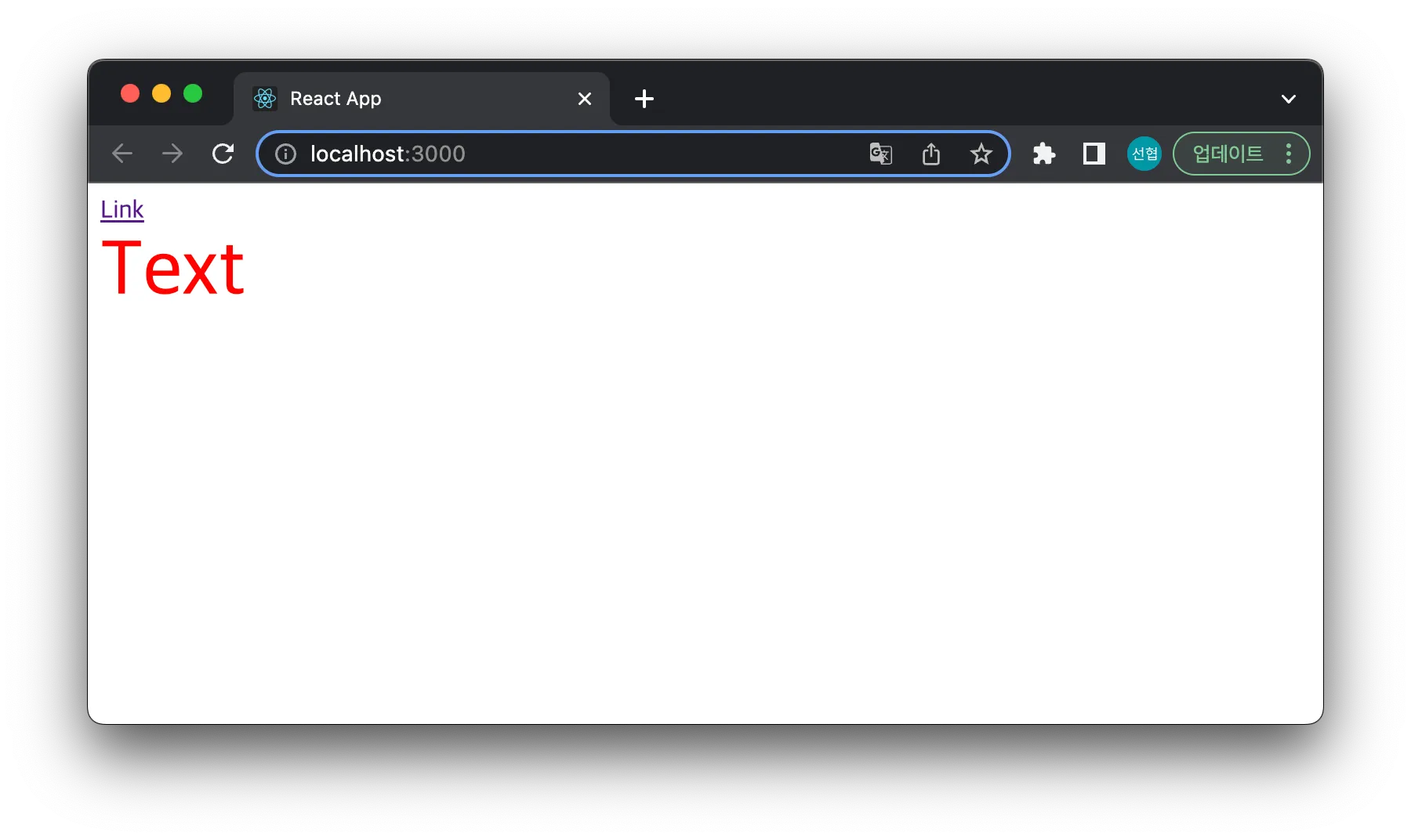
With PolymorphicComponentProps, a polymorphic component with extensible attributes was made easily. Here size and color were added. It can be used like this.
const App = () => {
  return (
    <View>
      <View as="a" href="https://kciter.so">
        Link
      </View>
      <Text as="div" color="red" size={50}>
        Text
      </Text>
    </View>
  );
};
The result screen shows that it was applied correctly.
Closing
This is how you can implement a polymorphic component that can be used in many places. Most of the UI libraries popular these days use this pattern for building components, so it helps to know it. The final code from this post is in the GitHub repository.
I haven’t yet covered components with extensible styles, like MUI’s Box component or Mantine’s Box component, which I introduced at the start. Covering that was my original goal, but the post was getting too long and finishing it would have taken a while, so I left it out. I plan to write a follow-up soon.
-
The autocompletion feature provided by Visual Studio family IDEs ↩