Debugging is an unavoidable fate that every developer has gone through at least once and will keep going through. We have all fixed everything from simple logical mistakes to bugs that kept us stuck for days because we could not figure out the cause at all. So why on earth do we have to keep debugging?
Most developers, myself included, are not building things where lives are at stake, like aviation or nuclear launch systems. So the products we build tend to choose productivity over stability, and the gaps in quality checks that result often turn into defects. In other words, since we don’t check things carefully enough to sacrifice productivity, it is close to impossible to eliminate defects completely, even with all the methodologies and tools meant to prevent them. Naturally, the bigger the scale, the harder it gets.
Fortunately, a program has no physical constraints, so even when a problem is found, it can be fixed before the product is released. That is why most developers use the strategy of implementing to a level that doesn’t hurt productivity, and when a problem occurs, resolving it quickly through debugging. Given this environment and culture, debugging is effectively an essential skill for a developer.
Any developer with some experience will have their own debugging principles. Since they are personal principles, the approach can differ from person to person. Some developers may not agree with this article, but I’d say I’m fairly good at debugging, and in this article I want to lay out my own principles.
Mindset
In some ways debugging can be seen as a minor skill, but for that very reason the mindset of how you approach it matters. While debugging, people often fixate on the wrong spot because of thoughts like “this must be where it’s wrong.” That happens when your view of a hypothesis goes past suspicion and turns into conviction. Many developers fall into this while debugging, and it consumes an enormous amount of time and also hurts the developer mentally.

So when debugging, a way of thinking that suspects everything, not just one part, is important.
Intuition and Detectives
A developer debugging is like a detective in a mystery novel. A detective narrows down the possibilities based on the situation and the evidence, sometimes gets help from people around them, and in the end deduces the culprit with excellent insight. A developer hunting a bug is not so different from a detective, because debugging is the process of finding the cause of a problem based on the given situation and data.

Solving a problem through debugging usually comes from the developer’s intuition.
Wait, intuition? Is it okay to use such a vague method? You might think so, but most of us have probably solved a problem through intuition before. Intuition isn’t guessing in an all-or-nothing way. It’s a way of solving problems based on the knowledge and experience you already have1. You can find the problem because you may have had a similar experience once before, and because you have related knowledge.
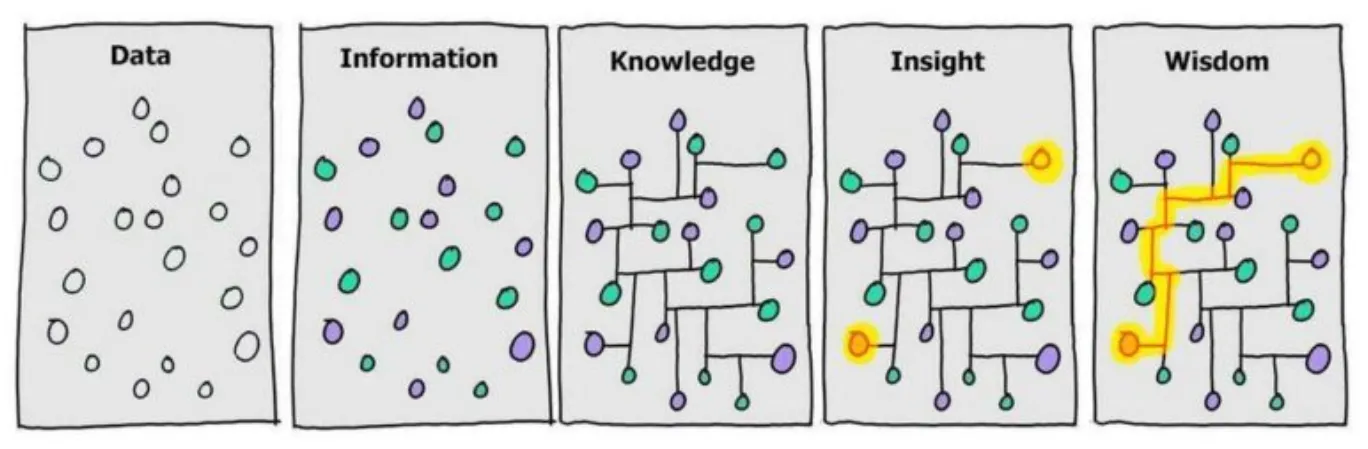
A developer collects data such as error messages, code, and the situation, analyzes it, and gets information like “this problem seems related to such and such.” Based on that information, the developer can obtain related knowledge from their own experience, the internet, books, or colleagues. Then, by connecting that knowledge to the problem, a hypothesis forms, which can be tested and the results analyzed to solve the problem. Here, connecting what I know to the problem is intuition.
Usually, when the answer pops out with a “wait, could it be this?”, it’s because you already have enough knowledge and a similar experience. That is, experience acts as a shortcut to intuition. If you lack the experience and knowledge, you may not get to the answer right away. Then you have to go through the process of building intuition2, even if it’s slow. The easiest way is to practice narrowing down the possibilities. That’s what the rest of this article is about.
Narrow Down the Possibilities
When you have eliminated the impossible, whatever remains, however improbable, must be the truth.
— Sherlock Holmes, The Sign of the Four
To find the cause of unexpected behavior, a developer who is debugging instinctively narrows down the possibilities. Rule out what it isn’t, one by one, and eventually you find the answer. Some developers have their own principles for this, and others just search haphazardly.
Personally, I think narrowing things down one at a time with a set of principles is more efficient. The bottom-up approach of just turning on the debugger and starting carries a high risk of falling into various traps. From here, I want to introduce the method I use when debugging, four steps for finding the problem. If you haven’t had any particular principles so far, you could use this article as a reference and build your own.
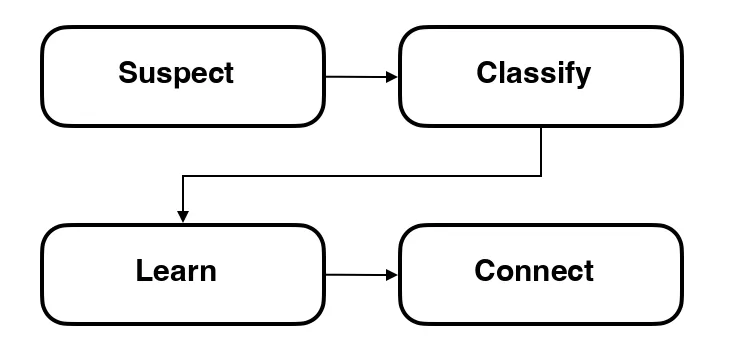
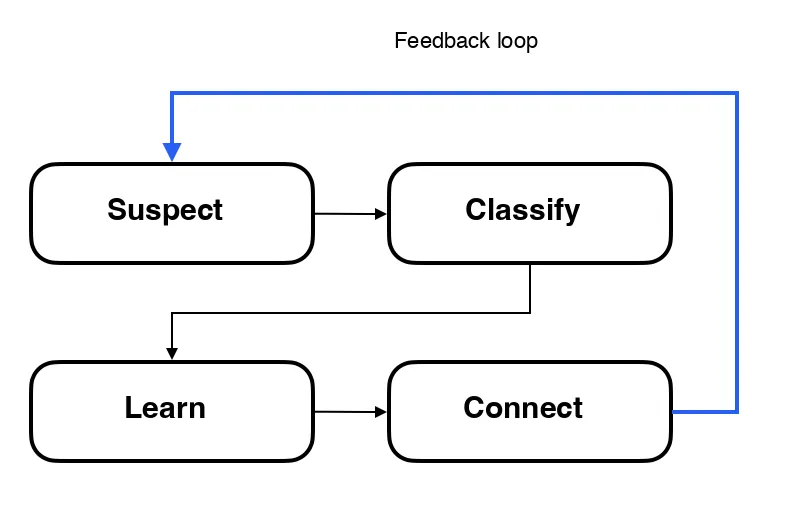
First, Suspect
Everything, from code, logs, error messages, monitoring data, and requirements to hardware, can be information for solving the problem. Collecting this information is the first step in narrowing down the possibilities.
There is all kinds of information you can collect. If something seems even slightly related to the problem, it’s best to suspect everything you can. Here are some examples.
- Check the error message.
- Check the result of the error.
- Check where the error occurred and the code that depends on it.
- Check the logs from the time of the error.
- Check the hardware state at the time of the error.
- Check how often the error occurs.
- Check whether anything changed from the previous code.
- Check the network state.
- …
Write a Checklist
Writing a checklist is a big help in keeping track of what I have checked and what I still need to check in order to narrow down the possibilities. Tying this to what was said above, it is the work of collecting and recording information. It may feel like a hassle, but writing a checklist often saves time instead.
A checklist can range from broad categories down to fine details. That doesn’t mean you should write a checklist for everything from the start. In debugging, narrowing down the problem area is what matters. So it’s best to check suspicious parts one at a time and add anything newly discovered back to the checklist. A checklist also helps prevent over-fixation, where you dig into or check only one particular part. And of course, since you can see what you’ve checked, it prevents duplicate work and lets you quickly think of what to suspect next.
To sum up, writing a checklist is useful for the following reasons.
- With a checklist, you know what you need to check and what you have checked.
- It helps prevent over-fixation on one area to some degree.
Look for Silly Mistakes
Before starting the actual debugging, it’s good to think for a moment about whether you made a really silly mistake. Typical examples are things like these.
- Typos
- Using the wrong variable
- Using the wrong condition
- Calculation mistakes
Mistakes like these often get ignored and skipped over when collecting information. But surprisingly often, mistakes like these turn out to be the cause of the problem. Here are some cases.
- A typo when checking against a hard-coded string
- Writing
if (a = 1)in a condition whereif (a == 1)was intended - Writing a calculation wrong, for example getting operator precedence wrong
- Using a local variable with the same name where a member variable was intended
fun convertToCode(fruit: String): Int {
  return when (fruit) {
    "apple" -> 1
    "banana" -> 2
    "cherry" -> 3
    "berry" -> 4
    "orenge" -> 5
    "kiwi" -> 6
    "grape" -> 7
    "mango" -> 8
    "pear" -> 9
    else -> throw IllegalArgumentException("Unknown fruit")
  }
}Of course, mistakes like these are not common. But you can’t say they never happen either. It would be better to implement things so these problems don’t arise in the first place, but circumstances don’t always allow it.
These mistakes can be hard to find even with a debugger, so before you start debugging properly, it’s good to suspect a silly mistake at least once. Some of these mistakes are shown as warnings by the IDE. So don’t ignore IDE warnings.
Remove Unnecessary Information
Once you’ve collected information, it will divide into things you know well and things you don’t. For things you know well, you can check right away whether they can be filtered out. For a simple, predictable problem, this is information that gets filtered out right at the collection stage. This can be called small intuition. Things you don’t know well, leave alone for now.
Deleting things from the checklist right away isn’t a great idea, though. There may be cases where you thought you knew something well but actually didn’t, or where the real problem turns out to be in the information you removed. So think it over a little, and if it’s unclear, set it aside separately for now. Then, if you still haven’t found the problem after checking every case, go back and review the list you set aside.
Second, Classify
How can you check more efficiently? In the closed system that is a computer, the possible causes are limited and can be classified. So it’s efficient to classify information appropriately as you collect it and assign priorities accordingly. Classifying information this way is the second step in narrowing down the possibilities.
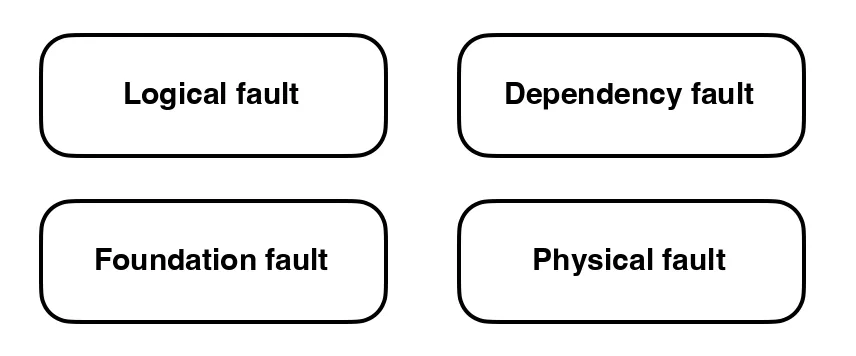
Which category to look at first depends on the situation. When a problem occurs, you will have some hunch about it. For example, if the problem is in code you wrote today, it’s likely a logical fault. Then it’s efficient to look first at the things directly related to the code, like the error message, the code, the logs, and the result of the bug, and then at related things like the hardware state and network state afterward.
On the other hand, if a problem related to the infrastructure environment occurs in a product that was already running fine, it’s likely unrelated to the code. In that case it may be more efficient to check the foundational technology first.
Logical Faults
Usually, most problems are caused by the mistakes of the person doing the work. Most of the time it’s logic written wrong, data handled wrong, or a wrong requirement.
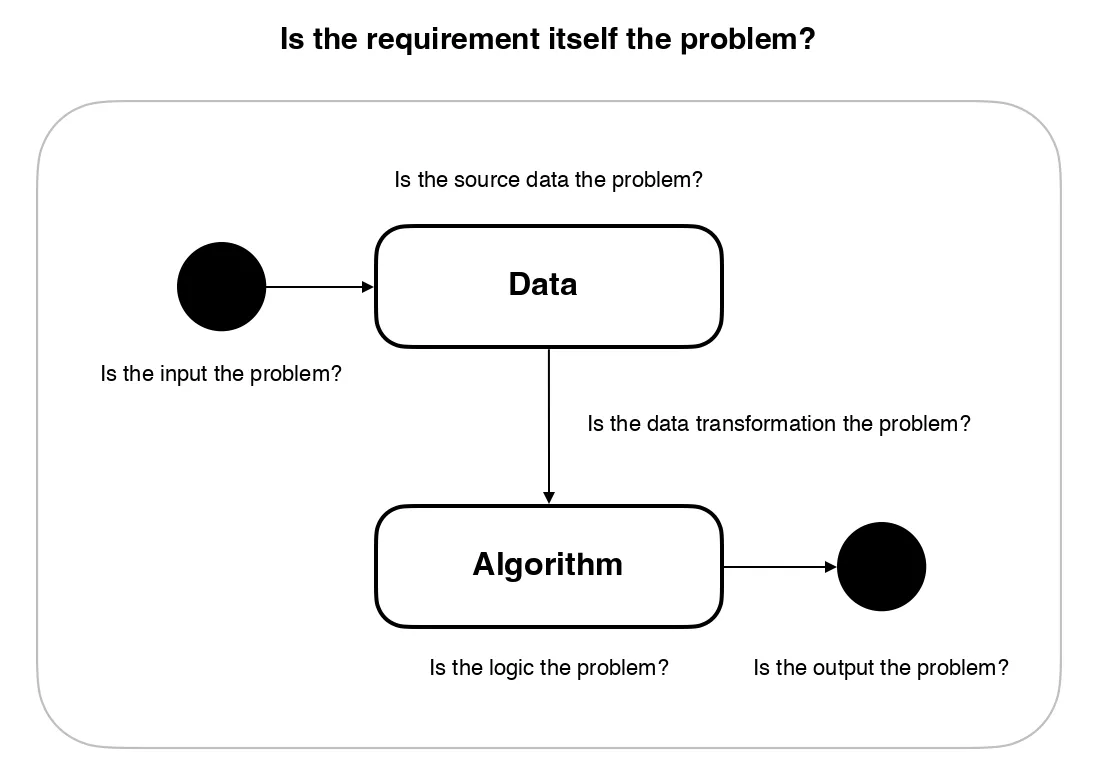
Logic isn’t only in the code. Logic includes the flow of data and the requirements too. So when checking for a logical fault, you should check not only the code but also the data flow and the requirements.
First, a fault in the logic is naturally a fault in the code you wrote. In most cases, using a debugger to follow the flow of the logic makes it easy to see whether there’s a problem. You can check without a debugger, of course, but with one it’s far more efficient.
For faults in the data, checking the state of the data is what matters. It’s important to check the state of the data through logs or with a debugger. There may be logical holes in how the data changes state, so that needs checking.
A fault in the requirements means the thing was designed wrong in the first place, regardless of whether it was implemented correctly. You see this surprisingly often when the process is complicated or ambiguous. If so, review the requirements again and resolve it by discussing with the person who planned it, or with the customer.
Dependency Faults
If there’s no logical fault, you should check whether there’s a problem in the technology you depend on.
By dependency, this article means frameworks, libraries, languages, and the like. The problems that can occur are broadly as follows.
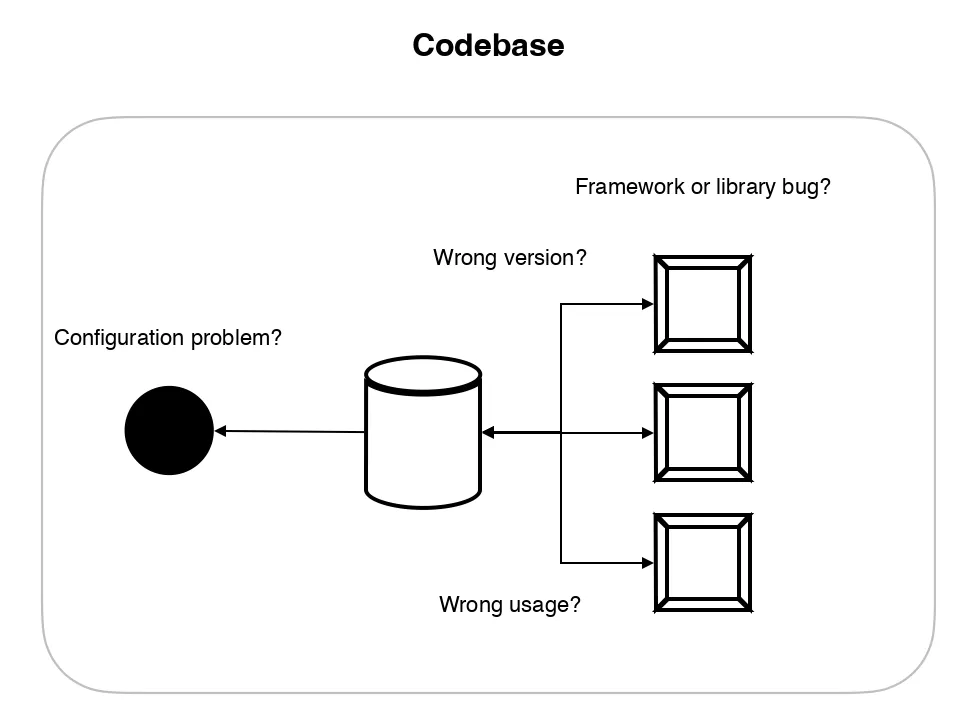
Configuration problems can mostly be solved by consulting the documentation of that technology. If something looks suspicious, check the docs carefully.
Version problems can mostly be solved by raising or lowering the version. With libraries in particular, versions often get bumped automatically through the dependency settings. When that happens, a bug may have appeared in the library itself, or a feature may have changed. Lowering the version can be the solution here. Or the reverse: you may be reading the latest docs while using an older version, and that causes the problem. So checking versions matters.
Wrong usage means, literally, the case where something was not used correctly. This mostly happens when you work from wrong information in outdated docs, Stack Overflow, or blog posts. This is solved by consulting the latest documentation of the technology. It’s similar to configuration problems.
Occasionally, the technology you depend on has a bug. These are really hard to find, and if the community isn’t active, they can be hard to resolve. If you suspect a bug in the dependency itself, the best thing is to ask the community or check the issue tracker of that technology.
Foundational Faults
Foundational faults come from a lack of underlying computer science knowledge, or from the operating system, networking, and so on. They are mostly problems from misusing processes or threads, or problems in memory, networking, or environments like the OS or the JVM. Solving these takes some computer science knowledge, and being good with the relevant debugging tools matters.
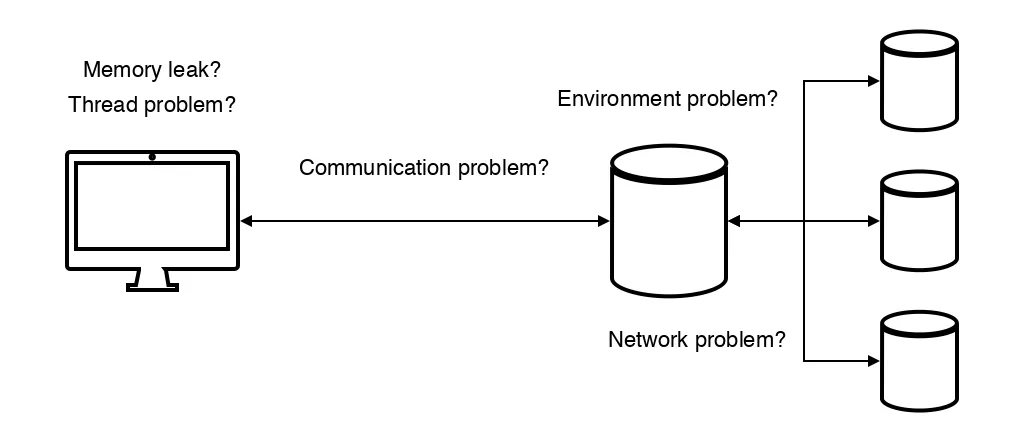
Memory problems are mostly caused by memory leaks. These can be checked with memory inspection tools. Occasionally methods like memory dumps are used as well.
Misusing processes or threads can cause synchronization problems. Bottlenecks can occur, or performance can get worse instead of better. It’s best to approach these with proper knowledge of concurrency and parallelism.
Communication problems are mostly caused by network problems. Most of the time it’s a timeout or a connection problem. These can be checked with network tools.
Some problems come from simply not knowing the environment well. Sometimes you look in the wrong place without realizing that memory is short or the disk is full, and sometimes a problem comes from wrong permission settings. Since these can occasionally become security problems, it’s good to study the environment you operate to some degree.
Physical Faults
A physical fault is the possibility of a hardware problem. It’s rare to get this far while debugging, but there are cases. If you really can’t find the cause, just in case, test on another machine or check whether the hardware is broken.
Third, Learn
The information you classified earlier as things you don’t know well will be hard to filter. In that case you have to learn based on the information. This process is the third step in narrowing down the possibilities.
You can learn in various ways. Internet searches, books, colleagues, and communities can fill the knowledge gap. The knowledge you gain this way helps you judge whether a piece of information is unrelated to the problem.
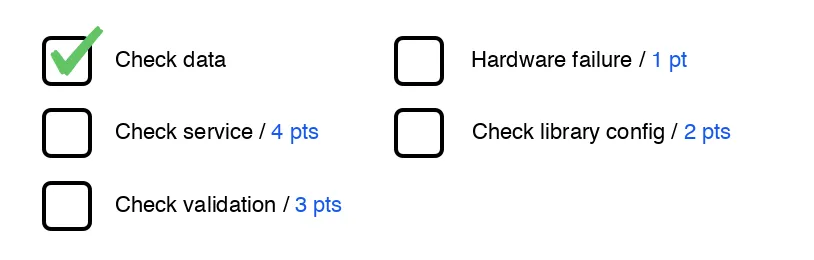
If you still can’t decide whether to remove it, one option is to give it a likelihood score3 and leave it for now.
Find the Knowledge Gap
Sometimes you don’t yet know what you don’t know. Then you first have to find what you don’t know. The best way is to try explaining what you know. Explaining to a colleague is good, and if you feel bad about taking up their time, rubber duck debugging4 works too.
As you explain, there will be a point where you get stuck. That point is exactly what you don’t know. Finding those parts and learning them will help you solve the problem.
Fourth, Connect
Now the information gathered and learned so far has to be connected to the problem. In the process, you form hypotheses and run experiments, crossing items off the checklist one by one until the problem is solved. This process is the last step in narrowing down the possibilities.
Form a Hypothesis
First you need to form a hypothesis, like “maybe this part is the problem?” Forming a hypothesis is the act of connecting information to the problem. The hypothesis has to be logically explainable, and there has to be a way to test it.
You can form a hypothesis just in your head, but if it won’t come together, write it down or draw a diagram. This not only organizes the thoughts in your head but also lets you check whether they make logical sense.
Experiment
Once you have a hypothesis, you need to run an experiment to verify it. Experiments can be done in various ways. Modifying the code, changing a setting, or testing in a different environment are all forms of experiment. Through the experiment you check whether the hypothesis holds, and if it was wrong, you form a new hypothesis and repeat the experiment.
Go Back
While forming hypotheses and experimenting, new insights can arise. Through these insights you can find new information, and based on that you can go back through the steps from the beginning, narrowing down the possibilities and getting closer to solving the problem. This behavior is a kind of feedback loop.
Preparing for Debugging
What I’ve written so far is a kind of methodology for debugging. But no matter how good your debugging skills are, if the available information is lacking, the problem is hard to solve. So preparation for debugging is needed in advance. Code that follows the following principles makes quick debugging possible when a bug occurs.
- Leave good logs
- Write code so the debugger can be used well
- Understand the concrete mechanism of how things work
Logs are really important information for debugging. They let you figure out the order of events and know the environment when a problem occurred. In an asynchronous environment they matter even more. If you want to respond quickly when a problem occurs, leave the ordering, the environment, the data, and so on in the logs.
The debugger should be considered from the moment you write code. Writing code so the debugger can be used well makes debugging far easier. Even if you aren’t skilled with the debugger, code that is easy to debug helps you solve problems quickly. For example, look at the following code.
val result = userService
  .getAllUsers()
  .filter { it.age > 20 }
  .sortedBy { it.age }
  .map { it.name }
It’s linear and not hard to read, so you could call it clean code. But this code is relatively hard to debug, because when a logical problem occurs in a chained method, it’s hard to see the intermediate results. Code that is easy to debug looks like this.
val users = userService.getAllUsers()
val filteredUsers = users.filter { it.age > 20 }
val sortedUsers = filteredUsers.sortedBy { it.age }
val result = sortedUsers.map { it.name }
Written this way, the intermediate results can be easily checked through the debugger. Of course, if you use the debugger’s features well, chained code can be debugged easily too. But for code more complex than the example above, it’s better to write code where the intermediate results can be checked.
There’s a saying about mending the barn after the cow is gone. With bugs too, once they’ve occurred it’s already late. Before that happens, it’s good to build the habit of writing code that follows debugging principles.
Closing
You might think isn't this overkill? Honestly, it is. But what I introduced above is a useful way to practice the intuition mentioned earlier. Even if it doesn’t lead straight to solving the problem, a small intuition may arise along the way. As you build up this sense, you’ll be able to solve problems faster when debugging later on.
These principles are also meant to keep you from getting buried in a single hypothesis. When you focus on only one hypothesis, it’s easy to miss other possibilities. If you feel you’re getting too absorbed in one thing while debugging, it’s good to look over the principles in this article once more.
…
Now that we’ve entered an era where AI produces code, debugging will paradoxically become more important. Being good at debugging will become that much more important a skill for a developer. So if you have your own useful debugging principles, I recommend writing them down as I did. And if you share good tips as well, nothing could be better.
-
Interestingly, Archimedes’ discovery of density, famous for “Eureka,” and Newton’s arriving at the law of gravity are both said to have come through intuition. ↩
-
Intuition happens unconsciously, so a precise definition is difficult. In this article, intuition is defined as a way of solving problems based on experience and knowledge. ↩
-
I score likelihood from 1 to 5. The score is subjective, of course. ↩
-
Rubber duck debugging: explaining your code, line by line, to a rubber duck on your desk. ↩